


Review Us On Google
Call Us Now
312-CHI-CAGO

100% Customer
Satisfaction

Review Us On Google
Chicago skyline

Posts Tagged ‘office moving tips’

Cover image for Chicago Office Movers showing a bright office with moving boxes and the headline “How Hard Is It to Relocate a Business”

How Hard Is It to Relocate a Business?

How Hard Is It to Relocate a Business?

Cover image for Chicago Office Movers showing a bright office with moving boxes and the headline “How Hard Is It to Relocate a Business”

Relocating a business is harder than most companies expect, and the difficulty rarely comes from the obvious things. The packing, the trucks, the physical move itself, and that part is usually fine. What catches businesses off guard is everything around it: the IT coordination that falls through, the lease timing that creates a two-month overlap, the employees who quietly start looking for other jobs when the commute gets longer.

For a small office of 10 to 15 people moving within the same city, a relocation is demanding but manageable. For a company with 50 or more employees, specialized equipment, or a complicated lease situation, it becomes one of the more involved operational projects a business will take on. How hard it is depends almost entirely on how early you start planning and how clearly the responsibilities are divided before anything gets packed.

The Part That Disrupts Business Most: Operations Going Dark

The single most damaging outcome in any office relocation is downtime, which is the period when your team cannot work because systems are being moved, internet is not yet active, or workstations are still in boxes.

Most businesses underestimate how long this window actually is. They plan for a weekend move and assume everything will be running by Monday morning. What they do not account for is that the internet provider needs 5 to 10 business days of lead time to activate a new line at the new address. Or that the server room cannot be reconnected until the IT vendor comes on-site, which may not be until Tuesday. Or that 15 workstations need to be individually set up and tested before anyone can log in.

Businesses that move without disruption treat the technology activation timeline as the anchor for everything else. They confirm internet provisioning dates first, then schedule the physical move around it. They do not move equipment until they know exactly who is reconnecting it and when. That sequence matters more than almost anything else in the planning process.

IT and Technology: Where Most Moves Break Down

Technology is where most office relocations get into trouble, because the complexity is easy to underestimate and the consequences of getting it wrong are immediate.

Moving desktop computers and monitors is a physical task. Moving a server room, a VoIP phone system, a network switch infrastructure, or industry-specific hardware is a coordinated technical project. These are not the same thing.

Before the move begins, every business should have clear written answers to the following questions. Who is physically transporting the servers, and are those machines under a maintenance or warranty contract that restricts third-party handling? Who is responsible for decommissioning the old network setup and building the new one? What is the confirmed activation date for internet and phone service at the new address? If that date slips, what is the backup plan?

The moving company handles the physical transport. Your IT team or managed service provider handles the technical reconnection. Your telecom and internet vendors handle the line activation. All three need to be confirmed and coordinated before move week, not during it. If you want a structured way to manage this, our IT office move checklist covers each of these coordination points in order.

Lease Timing Creates Pressure That Is Hard to Control

The lease situation at both locations is one of the few parts of an office relocation that is largely outside your control, which is exactly what makes it stressful.

On the old space, you may have a fixed end date with a restoration clause that requires you to return the space to its original condition before handing back the keys. Depending on how the office was built out over the years, that can be a real cost. On the new space, possession dates slip. Construction or prior tenant delays push your move-in date back, and your old lease does not automatically extend to accommodate it.

The result is that many businesses end up paying rent on two locations at once for a month or more. This is common enough that it should be budgeted for from the start, not treated as an unexpected cost when it happens.

The other lease issue that creates problems is underestimating how long the restoration and move-out process takes at the old address. Companies often plan their move-out date right up against the lease end date, leaving no time to handle furniture disposal, patch walls, or deal with anything that comes up. Building in at least two weeks between move-out and lease end date is a reasonable buffer.

Employees Notice How a Relocation Is Handled

Office relocations are watched closely by employees, and how leadership communicates about the move shapes how people feel about the company in ways that outlast the move itself.

The concerns employees have are practical. How does the new location affect the commute? Is parking available and at what cost? Will desk assignments change? What happens to the coffee setup? These feel like small things to leadership and like very real daily concerns to the people who have to live with them.

The mistake companies make is communicating too late or too vaguely. Announcing a move two weeks before it happens, with no detail about the new location or what the transition will look like, creates anxiety. Employees fill the information gap with their own assumptions, and those assumptions are rarely optimistic.

Companies that handle this well start communicating early, share specific information about the new space, and acknowledge openly that there will be an adjustment period. They do not oversell the new office as an exciting upgrade if employees are losing a shorter commute. Honest and specific is always better than enthusiastic and vague. For a practical approach to this, see our guide on how to prepare your employees for an office relocation.

Budget Overruns Are the Rule, Not the Exception

Almost every office relocation costs more than the original estimate. This is not usually because the commercial moving company changes its quote. It is because the first budget rarely captures everything that has a cost.

The categories that most commonly get missed are furniture replacement (pieces that do not fit the new layout or are in worse condition than realized), disposal fees for items left behind, temporary storage if the move-in date and move-out date do not line up, IT installation labor at the new space, signage at the new address, and small-but-real costs like new keys, parking validations, and updated marketing materials with the new address.

A realistic moving budget includes a contingency of 10 to 20 percent above the line-item total. Most businesses that skip the contingency end up spending it anyway; they just do it reactively instead of planned.
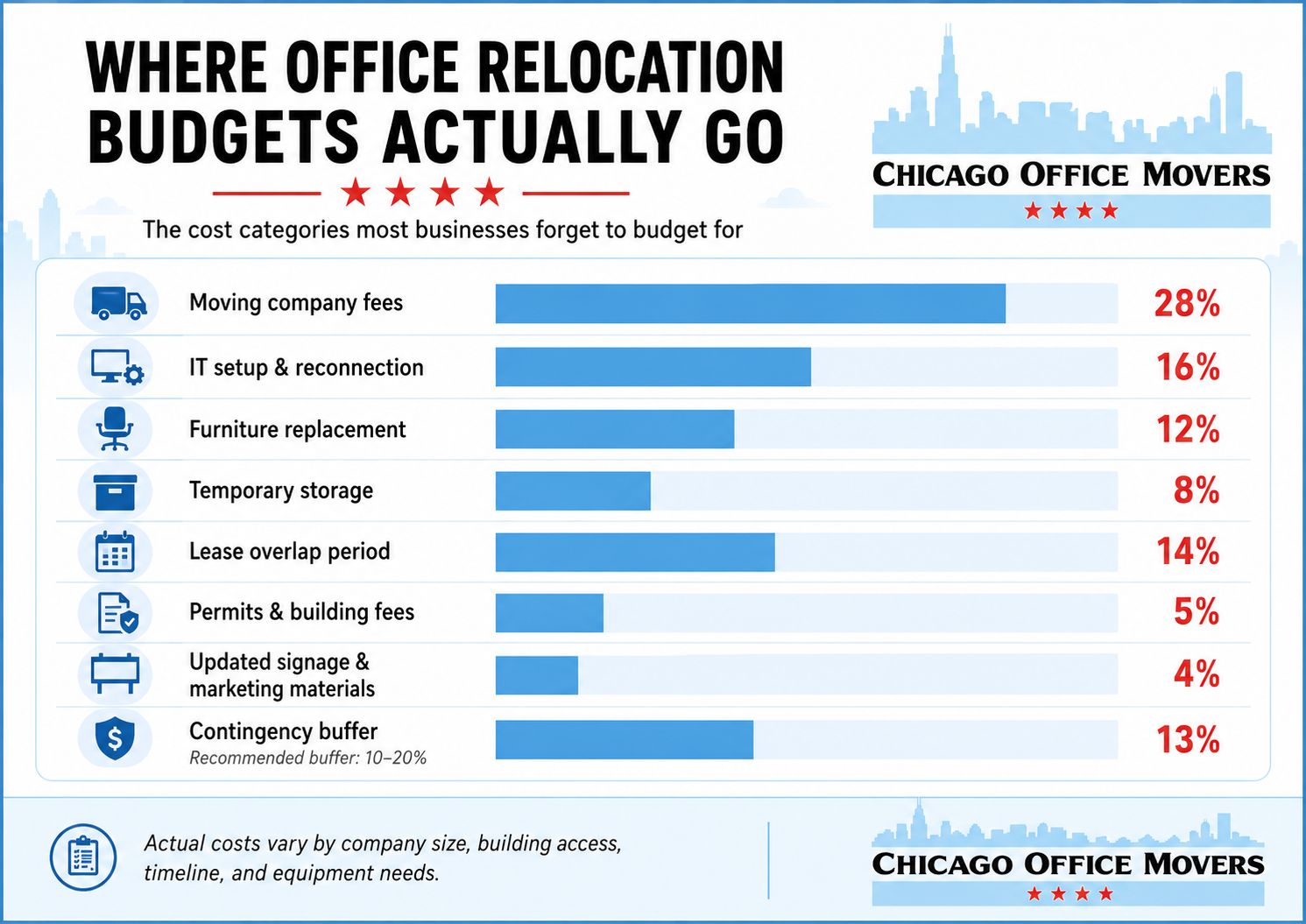
Office relocation budget breakdown

What Makes a Business Relocation Harder Than Average

A few specific factors consistently push a relocation from manageable to difficult.

Compressed timelines. Companies that begin planning 60 days or less before the move date are working in a hole from the start. Vendor lead times, internet provisioning, building access coordination, and employee communication all require more runway than that. Twelve to sixteen weeks is a more realistic planning horizon for a mid-size office.

Specialized or regulated equipment. Medical practices, labs, manufacturing companies, and businesses with heavy production equipment are dealing with a different level of complexity than a standard office. Some equipment requires certified riggers. Some has environmental or calibration requirements that affect how and when it can be moved. This needs to be scoped with the moving company well before the move date.

No internal project owner. Relocations that have no single internal point of accountability consistently underperform. When the move is shared across an office manager, an IT coordinator, and a facilities contact with no clear lead, decisions slow down, vendors get mixed signals, and things fall through the gaps. One person needs to own the project timeline and have authority to make calls.

Building constraints at either location. Loading dock hours, freight elevator availability, building management requirements around move times, and parking restrictions for large trucks can significantly affect how the move day runs. These details need to be confirmed with both buildings before the date is locked in. In Chicago specifically, moving trucks parking on city streets during a commercial relocation may require a permit from the city. This is an easy thing to overlook and an expensive problem on move day if it comes up. Our post on permits needed to relocate a business in Chicago covers what is typically required and how to get ahead of it.

What a Well-Run Office Relocation Actually Looks Like

A well-run business relocation looks boring from the outside. The trucks show up, the move happens over the planned window, the team comes in Monday and gets to work. What makes that happen is a significant amount of coordination that was completed in the weeks before move day.

The internet and phone vendors were confirmed six weeks out. The IT team had a written reconnection plan. The building managers at both locations were briefed on the truck access requirements. Employees received a detailed communication timeline with specific answers to the questions they actually care about. The moving company did a proper walkthrough of both spaces before providing a quote, not just a square footage estimate over the phone.

None of that is complicated. But all of it requires starting early enough to do it properly.

Call Chicago Office Movers If You're Moving Your Business

If you are planning an office move in Chicago or the surrounding area and want to understand exactly what the process involves for your specific situation, Chicago Office Movers can walk you through it. We have handled commercial relocations for companies across a range of industries and sizes, and we can give you a realistic picture of what your move requires before you commit to a timeline. Get in touch to schedule a consultation.

Contact Us

  • This field is for validation purposes and should be left unchanged.
  • MM slash DD slash YYYY
What is the best day of the week to move an office

Best Day of the Week to Move an Office (Complete Planning Guide)

What is the best day of the week to move an office

When it comes to moving an office, the day you choose can make a bigger difference than you might think. Pick the wrong day, and you risk disrupting employee productivity, increasing moving costs, and creating unnecessary chaos. Choose wisely, and your move can be efficient, cost-effective, and virtually seamless.

Quick Answer: What Is the Best Day to Move an Office?

The best day to move an office is typically Tuesday or Wednesday. These midweek days balance productivity, mover availability, and cost efficiency while minimizing disruption to your team and operations.

In this guide, we’ll break down the best day of the week to relocate your office, key factors to consider, and actionable tips to minimize downtime and keep your business running smoothly.

Why Choosing the Right Day Matters

The day you schedule your office move can have a significant impact on more than just logistics, it affects your team’s productivity, your budget, and the overall efficiency of the move. Here’s why it matters:

Employee Productivity & Workflow Disruption

Moving an office inevitably causes some downtime, but choosing the right day can minimize the impact. Midweek moves, for example, may interrupt crucial projects or client meetings, while end-of-week moves might allow staff to settle in over the weekend before business picks up again. Strategically timing your move helps keep your team focused and reduces lost productivity.

Cost Differences Between Weekdays and Weekends

Moving companies often charge different rates depending on the day. Weekdays can be busier and therefore more expensive, while weekend moves may offer cost savings but require careful planning to ensure all staff and services are available. Understanding these cost differences can help you balance your budget with your operational needs.

Moving Company Availability and Scheduling Constraints

The best movers are in high demand. Scheduling your move on a less busy day increases the chances of securing your preferred team and equipment. Early planning also allows flexibility if unexpected changes arise.

Traffic, Parking, and Building Access Considerations

Large office moves often involve trucks, equipment, and multiple staff. Choosing a day with lighter traffic, ample parking, and easier access to your building can save hours and reduce stress for everyone involved.

By carefully considering these factors, you can pick a moving day that keeps costs manageable, minimizes disruption, and ensures your move goes as smoothly as possible.

DayBest ForAdvantagesRisks
MondayFresh startClean slate for the weekHigh disruption, busy workload
TuesdayBalanced movesLess backlog, smoother transitionModerate coordination needed
WednesdayMost efficientBest availability, minimal disruptionLess buffer if delays occur
ThursdayPre-weekend prepTime to prepare beforehandDelays spill into Friday
FridayWeekend setupExtra time after moveHigh downtime risk
WeekendZero weekday disruptionNo impact on operationsHigher costs, limited access

Day-by-Day Breakdown: Finding the Best Day to Move Your Office

Choosing the right day for your office move isn’t just about convenience, it’s about balancing productivity, costs, and logistics. Here’s a closer look at the pros and cons of each day:

Monday – Fresh Start vs. High Workload

  • Pros: Starting the week with a move can feel like a fresh start, giving your team a clean slate in a new space.
  • Cons: Mondays are often the busiest day for most offices, with catch-up tasks and early-week meetings. A move can significantly disrupt workflow and make it harder to stay on top of pressing projects.

Tuesday – Minimal Disruption

  • Pros: Tuesday strikes a balance, most of the Monday backlog has been handled, and the week is still early enough to adjust. Moving on this day can minimize disruption and allow for a smoother transition.
  • Cons: Some departments may still be catching up from Monday, so careful scheduling is essential to avoid conflicts.

Wednesday – Often the Best Day Overall

  • Pros: Midweek moves tend to work well because the week is in full swing, allowing for efficient coordination without the pressures of Monday or Friday deadlines. Many moving companies also have more availability midweek.
  • Cons: If unforeseen delays occur, there’s less time to catch up before the week ends, so contingency planning is important.

Thursday – Risk of Spillover into End-of-Week Tasks

  • Pros: Moving on Thursday allows teams to spend most of the week wrapping up tasks and preparing for the transition.
  • Cons: Any delays can spill over into Friday, potentially impacting end-of-week deadlines and leaving employees working in a partially set-up office.

Friday – High Risk for Downtime & Incomplete Setup

  • Pros: Some may view Friday as convenient because it precedes the weekend, giving staff time to settle in afterward.
  • Cons: Friday moves carry a high risk of downtime, with limited time to resolve setup issues. Unfinished installations or tech setup can leave employees unproductive until the following week.

Weekend Moves – Higher Costs but Sometimes Necessary

  • Pros: Moving over the weekend minimizes disruption to weekday operations and can be ideal for offices with critical client-facing functions.
  • Cons: Weekend moves often come with higher labor costs, limited staffing, and restricted access to building services or elevators. Careful planning is required to ensure everything is ready by Monday.

Understanding the advantages and drawbacks of each day helps you make an informed decision that balances efficiency, cost, and employee productivity.

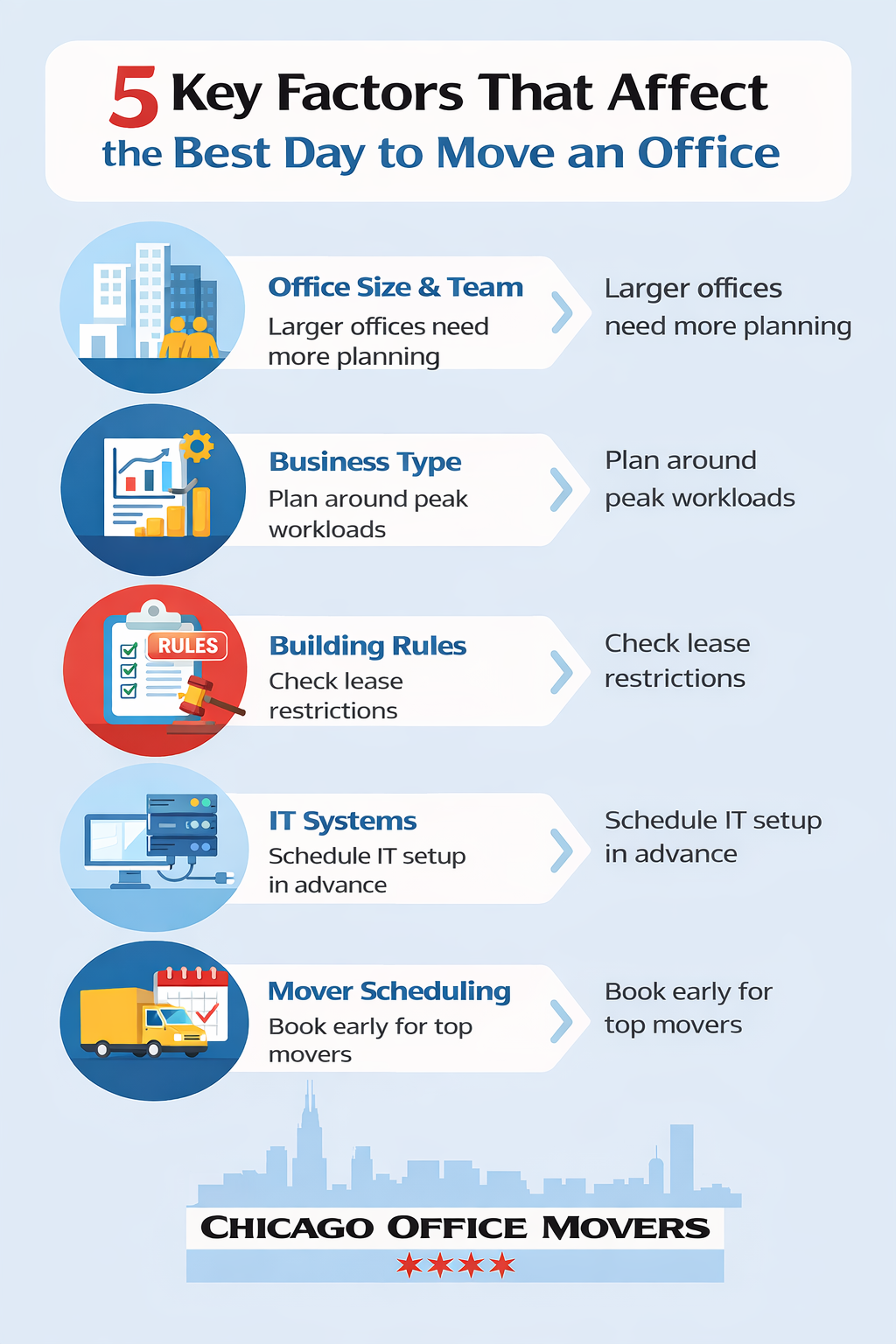
5 Key Factors That Affect the Best Day to Move

While a general day-of-the-week guide is helpful, the “perfect” moving day ultimately depends on several office-specific factors. Understanding these variables can help you tailor your move for maximum efficiency and minimal disruption.

  • Office Size & Number of Employees: Larger offices with more staff require more coordination, meaning midweek moves or weekend options might be preferable to avoid bottlenecks. Smaller teams may have more flexibility and can adjust more easily to weekday moves.
  • Type of Business / Industry: Different industries have different peak workloads. For example, tech companies may experience less client disruption during midweek moves, while retail or customer-facing services may need to schedule moves during off-hours or weekends to avoid affecting operations.
  • Lease Agreements & Building Rules: Some commercial leases include restrictions on moving days, hours, or elevator usage. Understanding your building’s regulations early ensures you avoid fines, access issues, or last-minute delays. If you are relocating locally, review permits needed to relocate a business in Chicago to avoid delays.
  • IT Infrastructure & Server Relocation Needs: Offices with complex IT systems or servers must account for setup and downtime. Choosing a day when IT staff or external technicians are available is critical, and often a weekend or late-week move works best to minimize operational impact.
  • Moving Company Schedules & Availability: Top-tier moving companies book quickly, particularly during peak seasons. The best day for your office move may be dictated by when your preferred movers are available, so early scheduling and flexibility can save both time and stress.

By considering these factors, you can select a moving day that aligns with your office’s unique needs, keeping the transition as smooth as possible while minimizing disruption to your team and operations.

5 Key Factors That Affect the Best Day to Move infographic

How to Decide the Best Day for Your Office

Once you've weighed the pros and cons of each day and considered the factors unique to your office, it's time to make a concrete plan. For a complete framework, see our guide to planning your business move. Here's a step-by-step checklist:

  1. Identify Critical Departments
    Determine which teams or departments are essential to keeping operations running. Schedule their move at a time that minimizes workflow interruptions and ensures key projects continue without major setbacks.
  2. Confirm Mover Availability
    Reach out to your preferred moving company early to secure the best day. Availability may influence your choice, especially if you require a larger crew, specialized equipment, or weekend access.
  3. Coordinate IT & Telecom Setup
    For offices with complex technology, coordinate with IT staff or service providers to ensure servers, phones, and networks are disconnected, transported, and reconnected efficiently. Consider scheduling the move around off-hours or weekends if downtime needs to be minimized.
  4. Communicate with Employees
    Keep your team informed about the moving schedule, expectations, and any temporary workflow changes. Clear communication reduces confusion, prevents mistakes, and keeps everyone on the same page.
  5. Plan for Contingency Delays
    Even the best-laid plans can hit snags, traffic delays, elevator access issues, or last-minute IT complications can occur. Build in buffer time and prepare backup plans to keep the move on track.

If you are working on a tight timeline, this guide on how to plan a last-minute office move in Chicago can help you stay organized.

5 Tips to Make Any Day Work

Even after choosing the ideal day, there’s always a chance that scheduling constraints, building rules, or other factors will force you to move on a less-than-perfect day. With careful planning, however, you can make any day work. Here are some practical tips:

  1. Pack and Label Early
    Start packing non-essential items well in advance, and clearly label boxes by department, employee, or function. Early organization makes unpacking faster and reduces confusion on moving day.
  2. Hire Experienced Commercial Movers
    Professional movers who specialize in office relocations can handle large equipment, delicate electronics, and heavy furniture safely and efficiently. Their expertise helps minimize downtime, regardless of the day you move.
  3. Schedule IT Disconnect/Reconnect in Advance
    Coordinate with your IT team or service providers to schedule technology disconnections, relocations, and reconnections ahead of time. This ensures your servers, phones, and network are up and running as quickly as possible after the move.
  4. Communicate Clearly with Staff
    Keep employees informed about timelines, responsibilities, and any temporary workflow changes. Clear communication helps your team stay organized and reduces stress during the transition.
  5. Prepare a Backup Plan for Unexpected Issues
    Even the most carefully planned move can encounter hiccups such as traffic delays, elevator access issues, or last-minute tech problems. Have a contingency plan in place to keep the move on track and maintain business continuity.

Having the right equipment in place can make all the difference. If your move requires a trailer rental, explore local options that keep your relocation on track.

Choosing the Best Day and Making Your Move Stress-Free

While midweek is often the sweet spot for office moves, the truth is that the “best” day depends on your team, your workflow, and your office’s unique needs. By considering factors like employee schedules, IT requirements, building rules, and mover availability, you can select a day that minimizes disruption and keeps your operations running smoothly.

No matter which day you choose, preparation is key. Packing early, hiring experienced movers, coordinating technology, and communicating clearly with staff will help ensure a seamless transition.

Planning an Office Move in Chicago?

If you’re planning an office move in the Chicago area, partner with professionals who understand the complexities of commercial relocations. Chicago Office Movers offers expert commercial moving services designed to handle every detail, from heavy equipment and IT infrastructure to furniture setup, so your team can get back to work quickly.

Contact Chicago Office Movers to plan your office move today and let us make the process smooth, efficient, and stress-free.

Best Day for an Office Move FAQs

Can I move an office on a Friday?

Yes, you can, but it comes with some risks. Friday moves may result in incomplete setups or IT downtime that carries into the following week. If you choose Friday, plan carefully, coordinate IT and key staff in advance, and allow time for any last-minute adjustments.

How long does an office move usually take?

The duration depends on your office size, number of employees, and complexity of equipment. A small office might take a few hours, while a mid-sized office can take a full day. Larger offices with multiple departments, server setups, or specialized equipment may require a multi-day move.

Are weekend office moves more expensive?

Often, yes. Weekend moves can carry higher labor costs due to premium rates and limited staff availability. However, they can reduce disruption to weekday operations, making the extra cost worthwhile in some cases.

What should I prioritize when scheduling my office move?

Focus on minimizing disruption to critical departments, ensuring mover and IT availability, and adhering to building rules. Clear communication with employees and planning for potential delays will help the move go smoothly, regardless of the day you choose.

What day of the week is moving usually cheapest?

Moving is usually cheapest on weekdays, especially Tuesday and Wednesday. These midweek days tend to have lower demand, which can lead to better availability and more competitive pricing. Fridays and weekends are typically more in demand.

At Midwest Moving & Storage, pricing is not based on the day of the week. Instead, costs are determined by factors such as the size of the move, labor required, and overall logistics.

What is the most expensive month to move?

The most expensive months to move are typically June, July, and August, with July often being the peak. Demand is highest during the summer due to favorable weather, school breaks, and lease cycles, which can lead to higher pricing and limited availability.

Can you move an office in one day?

Small offices can often be moved in one day, while larger offices may require multiple days depending on the complexity of equipment and setup requirements.

Contact Us

  • This field is for validation purposes and should be left unchanged.
  • MM slash DD slash YYYY
how to clean office chair

How to Clean an Office Chair: Practical Step-by-Step Guide


how to clean office chair

If you’ve been using your office chair daily—whether at home or in a corporate workspace—it’s probably due for a deep clean.

While most people wipe down their desks and keyboards regularly, they often overlook the office chair, one of the most-used and most-touched items in a work environment. Sweat, dust, food crumbs, pet hair, and body oils slowly accumulate in the fabric, mesh, or leather surfaces. Over time, this build-up can lead to odors, visible stains, and even skin irritation or allergies.

In this comprehensive guide, we’ll show you exactly how to clean your office chair, step by step, based on its material—fabric, mesh, leather, or vinyl. You’ll also learn how to clean the wheels, remove odor naturally, and disinfect high-touch areas safely, using tools and supplies you already have at home.

Why It’s Important to Clean Your Office Chair Regularly

Office chairs are used for hours on end, often without a second thought about hygiene. But research shows that the average desk chair can harbor thousands of bacteria per square inch, especially in shared workspaces.

Cleaning your office chair regularly helps:

  • Improve indoor air quality by reducing allergens
  • Extend the lifespan of upholstery and parts
  • Prevent odor buildup, especially from sweat
  • Maintain proper function of wheels and levers
  • Create a more professional and comfortable workspace

According to the American Journal of Infection Control, fabric furniture in office settings can be a hidden source of allergens and microbial growth if not properly cleaned.

What You’ll Need to Clean an Office Chair

Here’s a list of basic supplies you’ll want to gather before getting started. Most of these are household items:

  • A vacuum with a brush or upholstery attachment
  • Microfiber cloths
  • Dish soap (mild and unscented)
  • Warm water
  • White vinegar (for odor removal)
  • Rubbing alcohol or upholstery stain remover
  • Soft-bristled brush or an old toothbrush
  • Compressed air (for cleaning wheel crevices)
  • Leather cleaner and conditioner (if applicable)

At First: Check the Cleaning Code

Look under the seat or on the tag to find a cleaning code that tells you what cleaning methods are safe:

  • W – Use water-based cleaners
  • S – Use solvent-based cleaners
  • W/S – Either water- or solvent-based cleaners are safe
  • X – Vacuum only; no moisture

How to Clean an Office Chair: Step-by-Step by Material

step by step guide to clean office chairs

1. Cleaning a Fabric Office Chair

Fabric is a popular choice for office chairs because it’s comfortable and breathable. But it also absorbs sweat, food stains, and odors more easily than other materials.

Step-by-Step Instructions:

  1. Vacuum the entire chair, including the seat, back, arms, and underside, to remove loose dirt, hair, and crumbs.
  2. Mix a solution of warm water and a few drops of dish soap in a small bowl or spray bottle.
  3. Dampen a microfiber cloth in the solution (do not soak it) and gently blot any stained areas. Avoid scrubbing hard.
  4. Rinse the cloth with clean water and wipe again to remove soap residue.
  5. Allow the chair to air dry completely. You can open windows or use a fan to speed up the drying process.

2. Cleaning a Mesh Office Chair

Mesh chairs allow for airflow and are great for warmer environments, but their open weave tends to trap dust, lint, and hair.

How to Clean a Mesh Chair:

  1. Vacuum thoroughly with a brush attachment to remove debris from the mesh backrest and seat.
  2. Use a soft-bristled brush to loosen stubborn particles embedded in the mesh.
  3. Mix mild soap and water, dip a cloth in the solution, and gently wipe the mesh surface. Avoid using too much water, as mesh can stretch or warp.
  4. Let the chair air dry completely before sitting again.

3. Cleaning a Leather Office Chair (Real or Faux)

Leather chairs make a workspace look professional and polished—but they require specific care to prevent drying, cracking, or fading.

Here’s how to clean a leather office chair properly:

  1. Use a dry microfiber cloth to wipe away dust and surface debris.
  2. Mix equal parts distilled water and white vinegar, or use a leather-specific cleaner.
  3. Apply the solution using a soft cloth—never spray directly onto the leather.
  4. Gently wipe down the surface in circular motions.
  5. Use a dry cloth to absorb moisture and avoid water spots.
  6. For real leather, apply a leather conditioner every few months to keep it supple and hydrated.

4. Cleaning a Vinyl or Plastic Office Chair

Vinyl chairs are often found in medical offices or minimalist setups. They’re the easiest to clean and require minimal maintenance.

Quick Cleaning Guide:

  • Spray an all-purpose cleaner or soapy water on a cloth and wipe the seat, backrest, and legs.
  • For tough grime, use a magic eraser or a soft sponge.
  • Rinse and dry thoroughly to prevent streaks or watermarks.

Don’t Forget: Clean the Chair Wheels and Armrests

Chair wheels (casters) collect more dirt than you think—from hair and lint to food crumbs and carpet fuzz. Dirty wheels reduce mobility and can scratch hardwood floors.

How to Clean Chair Wheels:

  1. Flip the chair upside down.
  2. Remove visible debris with tweezers or your fingers.
  3. Use compressed air or a small brush to dislodge stuck dirt inside the wheels.
  4. Wipe each wheel with a damp cloth.
  5. Apply a silicone-based lubricant to keep wheels moving smoothly.

To Clean Armrests and Adjustment Levers:

  • Use 70% isopropyl alcohol or disinfecting wipes.
  • Wipe down all high-touch areas: armrests, tilt levers, and height adjustment handles.

How Often Should You Clean Your Office Chair?

Cleaning TaskRecommended Frequency
Vacuuming or DustingWeekly
Spot Cleaning (Stains)As Needed
Deep Cleaning (All Surfaces)Monthly
Wheel MaintenanceEvery 2–3 Months
Leather ConditioningEvery 3–6 Months
Disinfecting Touch PointsWeekly or After Illness

Expert Tips to Keep Your Office Chair Clean Longer

  • Use a washable seat cover to reduce wear and odor buildup.
  • Avoid eating at your desk to prevent food stains.
  • Keep pets off the chair—fur can be difficult to remove from fabric and mesh.
  • Clean up spills immediately to prevent permanent stains.
  • Vacuum your floors regularly to stop debris from transferring to chair wheels.

Ready to Move Your Chicago Office? Let Us Handle the Heavy Lifting

Relocating your office is a big task — from carefully packing sensitive equipment to moving bulky furniture like desks, chairs, and conference tables, it can quickly become overwhelming. That’s why Chicago Office Movers is here to help.

We specialize in full-service corporate relocations tailored to businesses of all sizes throughout the Chicago area. Our expert team handles everything from packing and unpacking your files and technology to disassembling, moving, and reassembling your office furniture with precision and care.

Whether you’re moving across the street or to a new city, we make sure your office move is smooth and efficient, minimizing downtime so your team can get back to work fast. Plus, with flexible scheduling options—including evenings and weekends—we work around your business hours.

Don’t stress over the logistics—let Chicago Office Movers take care of the heavy lifting and details, so you can focus on what really matters: running your business.

Call Chicago Office Movers today or contact us online for a free consultation and customized moving plan tailored to your office’s unique needs.


Frequently Asked Questions

Can I use a steam cleaner on my office chair?
It depends on the chair. If your chair has a “W” or “W/S” tag underneath (meaning it can handle water-based cleaning), a light-duty steam cleaner can be safe—but always keep the heat and moisture low. Never use steam on mesh or leather chairs—it can warp the material or cause it to crack over time. I’ve seen well-intentioned DIYers ruin chairs that way.
How do you remove sweat stains or smells from an office chair?
That’s a common issue, especially in warmer offices or home setups with no AC. Mix equal parts white vinegar and water in a spray bottle and lightly mist the seat—don’t soak it. Let it sit for a few minutes, then blot with a clean cloth. If the smell lingers, try the baking soda trick overnight and vacuum it the next day. Works wonders.
What should I use to clean a mesh office chair without damaging it?
Mesh is great for airflow but tricky to clean. Use a vacuum and soft brush first to get into the weave. Then gently wipe it with a damp cloth and mild soap. Avoid soaking it or using scrub brushes—I've seen people stretch or rip mesh by accident. Light pressure and a soft touch go a long way.
How often should I clean my office chair?
If you’re using it daily, vacuum it once a week and wipe it down at least once a month. For deep cleaning, aim for every 2–3 months, especially if you’re in a shared space or tend to snack at your desk. Trust me—routine maintenance saves you from much bigger cleaning headaches later.

Contact Us

  • This field is for validation purposes and should be left unchanged.
  • MM slash DD slash YYYY
How to disassemble an office cubicle

How to Disassemble an Office Cubicle for Moving | Step-by-Step Guide

How to disassemble an office cubicle

Office cubicles can last for years, which is why most businesses bring them along when they relocate instead of buying new. But moving a cubicle system isn't as simple as unplugging a desk and rolling it out the door. Panels, connector rails, and built-in cabinets all have to come apart in the right order, or you risk damaged parts and a reassembly headache at the new office. Here's what it actually takes: the tools, the order of operations, and a few brand-specific quirks that trip people up if you don't know to look for them.

Why Reuse Cubicles Instead of Buying New?

Reusing existing cubicles has clear advantages over replacing them:

  • Cost savings: A new standard cubicle (6' x 6' or 8' x 8') runs $800 to $2,000 per unit; larger units can run $4,000 or more.
  • Lower installation costs: New cubicle installation typically costs $240 to $1,600 per unit, depending on complexity and location.
  • Eco-friendly: Reusing furniture reduces waste. The U.S. EPA notes that reuse conserves natural resources and cuts greenhouse gas emissions compared to manufacturing new products.
  • Faster move-in: Employees can get back to work immediately instead of waiting on new furniture orders and installation crews.
  • Less downtime: You skip the lead time associated with manufacturing and shipping new units.

For most businesses, reusing cubicles is the more affordable and sustainable choice, as long as they're disassembled correctly.

How Long Does Cubicle Disassembly Take?

For a standard two-panel workstation, two people working together can typically disassemble one cubicle in 30 to 45 minutes once tools are staged and cables are disconnected. Larger workstations with built-in cabinets, shelving, or non-standard connector hardware can take an hour or more per station. Budget extra time for the first few cubicles while your crew gets a feel for the system. The process speeds up considerably after that.
For an office with 20+ cubicles, most companies find it faster and safer to split the work between an in-house team and professional movers, or hand the whole job to a moving crew experienced with office furniture systems.

Tools You'll Need

  • Flat-end screwdriver (and Phillips, depending on hardware)
  • Adjustable wrench
  • Rubber mallet
  • Ladder (for upper panels)
  • Safety gear: gloves and goggles
  • Labeled plastic bags or a labeling gun for hardware
  • Furniture dolly or cart for moving panels

Step-by-Step Cubicle Disassembly Process

The advantages of repurposing existing cubicles are clear. When a relocation is around the corner, it’s necessary to prepare the cubicles for the move. Companies can either delegate the disassembly task to professional commercial movers or handle it themselves. Here are the steps for a DIY disassembly.

1. Alert Staff

Give employees notice before disassembly begins. This gives them time to pack up personal items and files, and it prevents confusion or lost belongings once the crew starts working.

2. Take Photos Before You Start

Photograph each workstation from multiple angles before touching anything. These photos become your reference guide for reassembly, especially for panel order, connector placement, and cable routing.

3. Disconnect All Components

Shut off power and unplug all cords from computers, monitors, printers, and other electronics. Bundle and secure cables so they don't tangle or get damaged, and to eliminate tripping hazards during the teardown.

4. Use Color-Coded Labels

Label cables, cords, and hardware with colored stickers. Match colors with corresponding parts to speed up reassembly and avoid confusion. This simple step can save hours when setting up the new office.

5. Remove Built-In Cabinets, Desks, and Shelves First

Cubicle walls can't come down until everything mounted to them is removed. Work in pairs:

  • One person unscrews desks, overhead cabinets, and shelving.
  • A second person supports each piece so it doesn't drop when the last screw comes out.
  • Place all screws and brackets in a labeled bag immediately. Loose hardware is the easiest thing to lose on a job site.

6. Remove the Panels

Start with the outermost panels and work inward:

  • Remove screws, spring latches, and levers holding each panel in place.
  • Lift heavy panels with two people to avoid injury or dropped panels.
  • Stack removed panels in an organized, labeled area so they're easy to load and easy to reassemble in the same configuration.

7. Detach the Connector Rails

Connector rails are what tie adjoining panels together, and the hardware varies by manufacturer: spring latches, connector rods, or bolts are the most common. Use an adjustable wrench for bolted connections. If there's no visible bolt, a flathead screwdriver gently pried at the seam usually releases the panel; a light tap with a rubber mallet can free stuck connectors without damaging the panel finish. Keep a second person nearby any time you're working near a ladder or an elevated panel.

8. Break Down the Frame

Once panels are clear, the internal frame, meaning the vertical supports and base plates, usually comes apart with a screwdriver or wrench. Bag and label this hardware separately from the panel hardware, since the two rarely interchange between cubicle models.

Disassembly Tips by Cubicle Brand

Connector hardware differs enough between manufacturers that it's worth knowing what you're working with before you start:

  • Steelcase (Answer, Kick, Montage): Panels typically use spring-loaded connector clips at the top and bottom of each panel edge. Press and lift rather than unscrewing. A flat pry tool works better than a screwdriver for releasing these clips without bending them.
  • Herman Miller (Action Office, Canvas): Often uses hanging brackets and cam-lock connectors between panels. Look for a small access slot on the panel edge where a screwdriver rotates the cam to release it.
  • Knoll (Reff, Dividends): Frequently bolted rather than clipped, so an adjustable wrench or hex key will get you further than a mallet.
  • Unbranded or off-brand systems: These are the most likely to have non-standard hardware. Photograph connector points closely before removing anything, since replacement parts can be hard to source if something breaks.

If you're not sure what system you have, the manufacturer's logo is usually stamped on a connector bracket or the underside of a work surface, and most manufacturers publish teardown guides for their product lines.

Consider Professional Help: Chicago Office Movers

DIY disassembly works for a handful of cubicles with a spare afternoon and an extra set of hands. It gets riskier, and more expensive if something's damaged, once you're dealing with a full floor of workstations, non-standard hardware, or a tight moving timeline.

Chicago Office Movers handles cubicle disassembly and reassembly as part of full-service commercial moves. Our union crews are experienced with:

  • Cubicle, cabinet, shelf, and general furniture assembly and disassembly across major brands
  • Safely moving computer systems, electronics, and appliances
  • Complex equipment and assembly-line teardown
  • Tracking every bolt, cord, and label so reassembly at your new space matches the layout you had; see our tips on decorating cubicles at the new office once you're set up

Whether you have one cubicle or one hundred, our crews handle the teardown without losing hardware or damaging panels.

Call now 312-244-2246 or request your free quote online.

FAQs: Office Cubicle Disassembly

How long does it take to disassemble one cubicle?

Expect 30 to 45 minutes per standard workstation with two people, longer for units with built-in cabinets or non-standard hardware.

Can I disassemble cubicles myself, or do I need a professional?

A small number of standard cubicles can typically be handled DIY with basic tools and a partner. Larger offices, tight deadlines, or unfamiliar hardware are usually better handled by a professional moving crew to avoid damaged panels or lost hardware.

What should I do with cubicle parts I'm not reusing?

Sound panels and frames can often be resold, donated, or recycled through a furniture liquidator rather than sent to a landfill — ask your mover if they offer removal and donation coordination.


Contact Us

  • This field is for validation purposes and should be left unchanged.
  • MM slash DD slash YYYY
top-amenities-employees-want-in-the-office

Top Amenities Employees Want in the Office

top-amenities-employees-want-in-the-office

Enhancing morale and improving productivity are two important reasons to add desirable amenities to the workplace. But it’s crucial to find amenities that truly promote wellness rather than distract employees. Here are the top amenities staff want in the office.

Most offices are equipped with standard desks and chairs. These basics allow employees to perform their tasks. While standard equipment is necessary, offices that go above and beyond with extras, like snacks, a gym, pet-friendly areas, or optimum lighting, improve their staff’s overall work experience.

The best amenities not only improve employees’ physical comfort but create an enjoyable workspace. The management shows they genuinely care about the well-being of their team. As a result, employees are happier, more productive and motivated to carry out the company’s vision.

What are the top amenities office employees want?

1. Physical Amenities

Desirable amenities focus on improving certain aspects of employees’ work life. Amenities that promote physical well-being include ergonomic chairs and desks or an onsite gym where staff can exercise to stay fit. Amenities like these are designed to keep staff physically healthy.

In addition to ergonomic furniture that prevents issues from sitting for prolong periods, physical comfort amenities include healthy snacks in the break room or cafeteria. Personal lockers are also included in this category, as they help keep employees’ valuables safe and organized.

Onsite health services are another top amenity employees seek in an office. Easy access to screenings and wellness programs helps staff detect health issues early on. By contributing to their physical wellness, onsite health programs prevent workers from getting sick and taking time off.

top-amenities-employees-love-in-office-checklist

2. Emotional Amenities

Natural lighting is known for its mood-enhancing effects. Employees desire natural lighting for its numerous health benefits, such as reduced eye strain, fewer headaches, and less drowsiness. Staff make less mistakes, too, when they work in spaces with ample natural lighting.

Wellness rooms are likewise highly coveted. When ridden with stress or anxiety, staff have the opportunity to escape from the office chaos and into a wellness room for much-needed relaxation. The wellness room provides a calm, quiet environment and a break from the hustle and bustle.

3. Convenient Amenities

Working parents especially value office amenities that deliver convenience. With onsite childcare, staff are free to invest in work projects, knowing their children are nearby, safe, and cared for. Employees who take advantage of this amenity show increased productivity and less stress.

A shuttle or transportation service to and from a public rail or bus station makes a major difference in the satisfaction of employees who utilize public transportation. Not only does a shuttle service improve punctuality, but it adds a cost-savings measure for parking-related expenses.

Furthermore, a company that offers a shuttle service showcases their commitment to environmental sustainability, a major attraction for highly skilled talent. By reducing the number of cars on the road with a reliable transportation service, the company lowers their carbon footprint.

A furry friend is an instant mood-booster, reducing stress, anxiety, and depression. Employees who are allowed to bring their pets to the workplace continue experiencing their uplifted mood while engaged in projects. Pet-friendly zones at work are appreciated by pet owners.

4. Social Amenities

Connecting with colleagues is equally important for employee satisfaction at work. Opportunities for connection happen when companies designate spaces that encourage teamwork and collaboration. Collaborative workspaces and areas where employees can gather are two examples of highly sought-after social amenities.

By providing a place for colleagues to unwind or take breaks, companies foster a positive workplace environment where increased teamwork and engagement are the norm. Collaborative areas also allow for better problem-solving, information sharing, and trust-building. A sense of belonging develops among the team.

5. Technology Amenities

Today’s fast-paced companies rely heavily on technology. It’s no surprise employees value it, too. The latest technology empowers team members and allows them to communicate and collaborate no matter where they are located, whether onsite or working remotely. Improved data security is an additional benefit.

Work processes are streamlined with advanced technology. Automation tools, for instance, prevent staff from engaging in repetitive tasks while also reducing human error, saving the company time and money. Streamlined workflow processes provide greater flexibility and improve the staff’s quality of work.

Favored amenities increase employee satisfaction and retention. Companies that provide desirable amenities show that they are committed to promoting the well-being of their office staff. Plus, by adding top amenities, companies enhance their corporate reputation and attract highly talented workforces.

Drawing prospective talent and ensuring the satisfaction of existing ones are key reasons companies are urged to include the most desirable amenities in their office. Companies that experience space limitations, such as when adding a gym, might consider relocating to a larger office.

Professional Commercial Movers

When your company is looking to move to greener pastures, you’ll need a reliable commercial mover on your side. Chicago Office Movers is equipped with the dedicated moving crews, equipment, and experience to ensure your corporate relocation is as seamless as possible.

Our move counselors are available to help you plan your office relocation from start to finish. Moving crews can pack and unpack your office goods. Our movers are background-checked, licensed, and trained—so you can be assured that your valuables are in secure hands.

We offer several conveniences to add ease to your move. Short- and long-term storage options are available in our secure facilities. Movers are experienced in safely relocating a wide range of office goods, such as bulky furniture, sensitive IT systems, fragile electronics, and cubicles.

Your goods are loaded into our climate-controlled moving trucks featuring lift gates and air-ride suspensions to add a further layer of protection to your office items. Our corporate customers receive up-to-date tracking information, whether their goods are in our storage facility or trucks.

Give your employees the amenities they deserve. Relocate locally, long-distance, or internationally with the help of Chicago Office Movers. We’re among the most trusted office moving companies in Chicagoland. Call our Elk Grove Village, Illinois, office today to receive a free estimate.

Contact Us

  • This field is for validation purposes and should be left unchanged.
  • MM slash DD slash YYYY
Call us (312) 244-2246