


Review Us On Google
Call Us Now
312-CHI-CAGO

100% Customer
Satisfaction

Review Us On Google
Chicago skyline
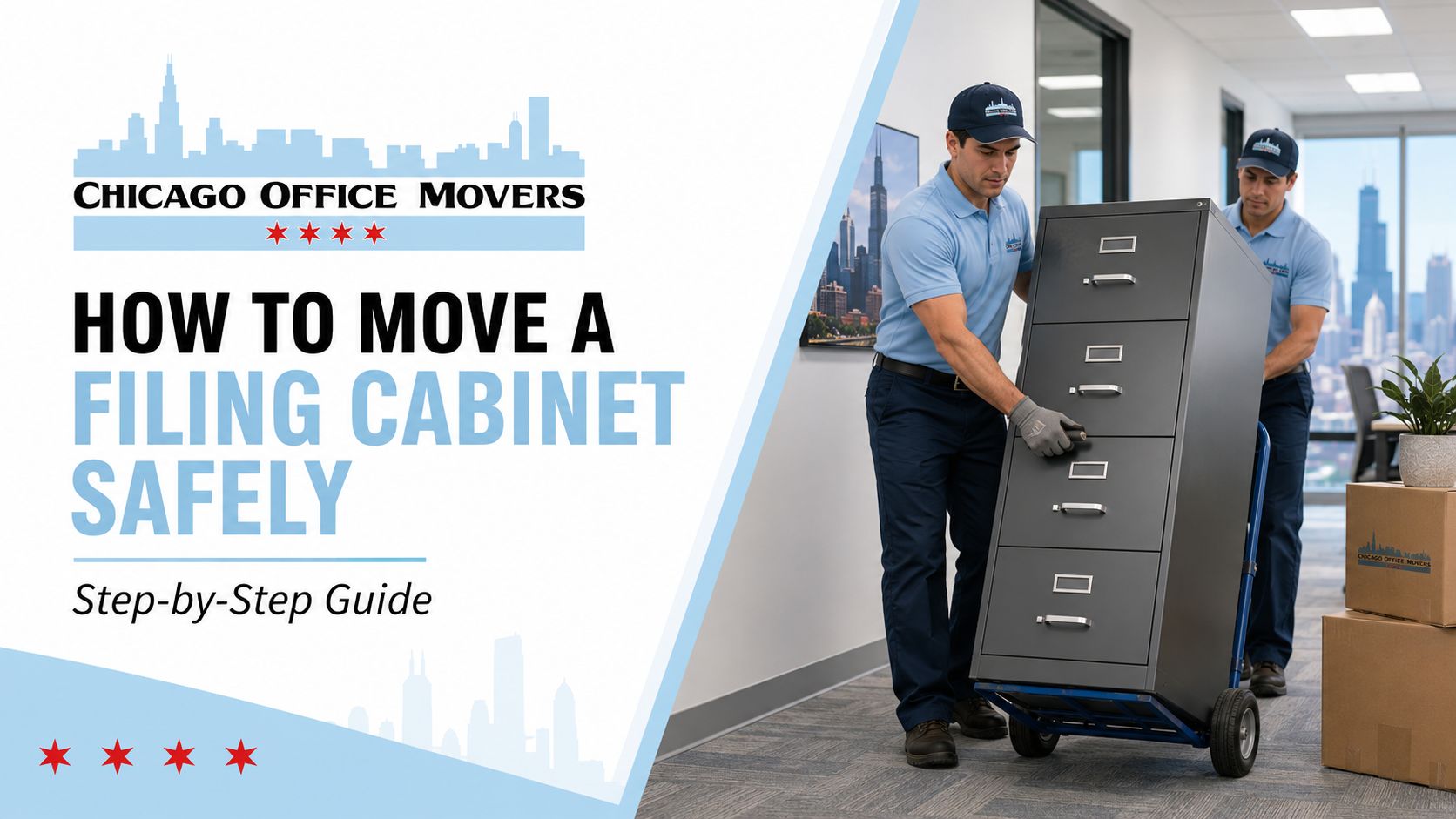
How to move a filing cabinet safely

How to Move a Heavy File Cabinet

How to Move a Heavy File Cabinet

How to move a filing cabinet safely

Anyone who has ever tried to shift a four-drawer steel filing cabinet three feet across an office knows the sinking feeling that comes with it: the thing simply does not move the way furniture is supposed to move. A loaded legal-size cabinet can easily weigh 200 to 300 pounds, and even an empty one is dense enough that "just grab it and go" is how people end up with thrown backs, cracked hardwood, and dented walls. We've moved plenty of these in and out of homes and offices, and the cabinets themselves are rarely the problem. It's almost always the plan, or the lack of one, that causes the damage.

This guide walks through the actual process, drawer by drawer and step by step, along with honest answers to the questions people search for most: whether you need to empty it first, whether it's ever okay to move one while it's full, and what to do if the thing works fine but looks like it belongs in a 1987 tax office.

The Equipment You Need to Move a Filing Cabinet Safely

Here's the equipment you need. It's simple and straightforward, and having it on hand before you start makes the whole move easier. If this cabinet is part of a larger office move, it's worth reading our 10 Office Moving Preparation Tips first, since a lot of the same prep work applies to every heavy item you're relocating.

  • A furniture dolly or hand truck rated for at least 300 to 400 lbs. A standard appliance dolly with a strap works best; a cheap plastic moving dolly will flex or crack under a full steel cabinet.
  • Moving straps or a furniture lifting harness. These redistribute the weight to your legs and shoulders instead of your lower back, and they let two people carry a load that would otherwise take four.
  • Furniture sliders or moving blankets for the base, if you're only shifting the cabinet a short distance across a floor.
    Painter's tape or packing tape to secure drawers shut.
  • A tape measure. Check doorway widths and turns before you commit to a path. Filing cabinets are narrow but tall and unforgiving on corners.
    Cardboard or a runner to protect flooring if you're dragging anything, even briefly.

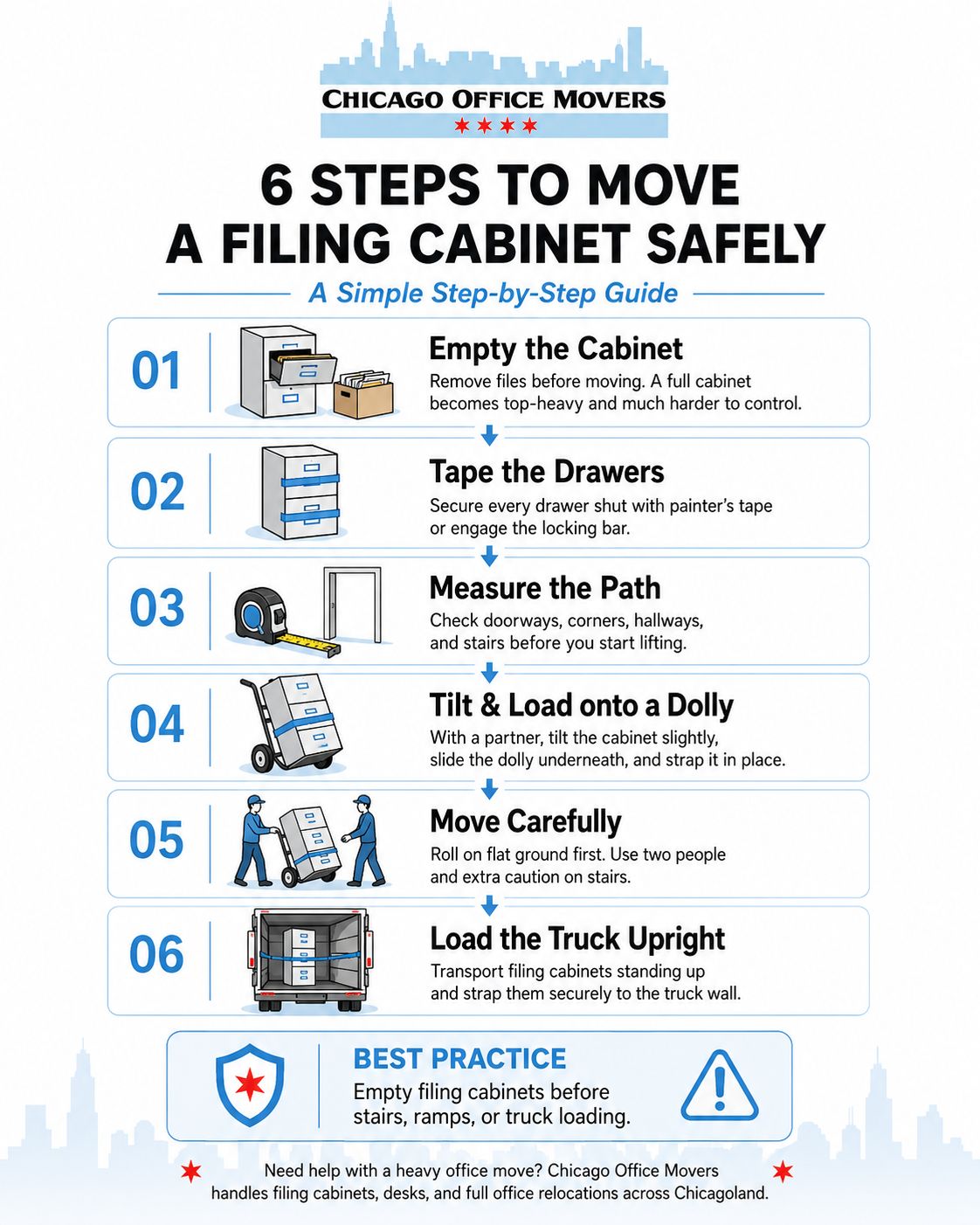
Step 1: Empty the Cabinet (Do You Have to Empty a Filing Cabinet When Moving?)

Yes. In almost every situation, empty the cabinet before you move it.

Once drawers are loaded, a filing cabinet gets top-heavy fast. The weight sits high, and it shifts forward the second a drawer isn't fully latched. A single packed drawer can weigh 40 to 60 pounds on its own. These cabinets are built to hold that weight while sitting still on a floor, not while tilting on a dolly. Move one fully loaded and a drawer can slide open mid-carry, which throws off the balance instantly. That's how cabinets get dropped, backs get hurt, and stairwells get gouged.

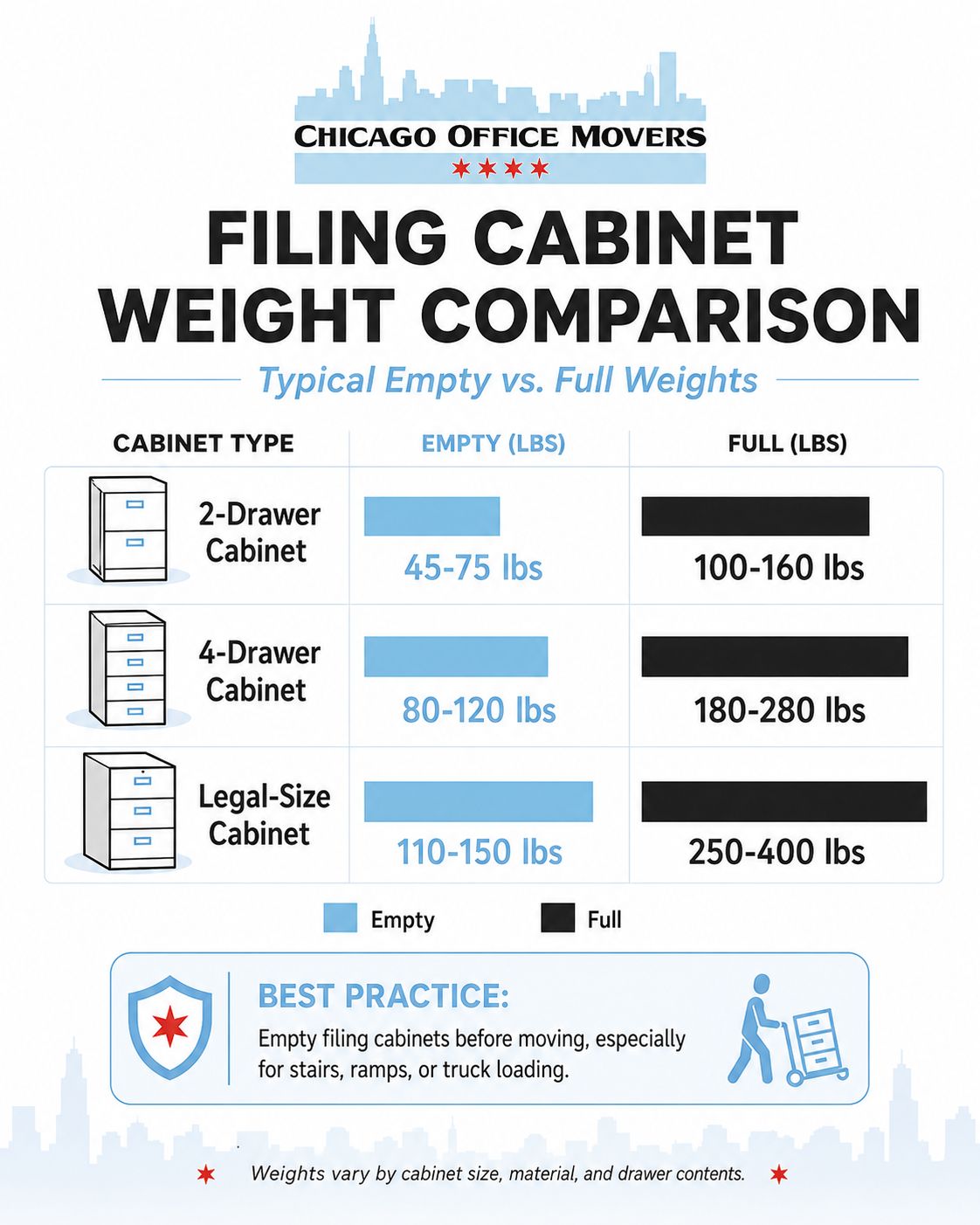
Emptying it also solves the weight problem on its own. A four-drawer legal cabinet can weigh close to 250 pounds full and drop to under 150 pounds empty, sometimes less depending on the steel gauge. That's the difference between two people carrying it by hand and needing a dolly, a ramp, or a moving crew.

There's one exception. If you're sliding the cabinet a few feet across the same flat room and it won't tip or leave that level, lighter drawers can usually stay in place. But the moment stairs, a doorway, a ramp, or a truck are involved, empty it first. Pull the drawers, box up the contents (folders hold up well in bankers boxes), and label each box by drawer. Refiling afterward will take minutes instead of an afternoon.

Filing cabinet weight comparison chart

Step 2: Tape and Secure Every Drawer

Once contents are out, or if you're leaving lighter drawers loaded, tape each drawer shut. Painter's tape works well because it won't strip paint or leave residue. Wrap the tape around the drawer front and onto the cabinet body itself, not just across the drawer face, so it can't work loose under vibration. If the cabinet has a locking bar, engage it; that alone often keeps every drawer secured without needing tape at all.

Step 3: Clear and Measure the Path

Walk the entire route before you lift anything: doorways, hallway turns, stairwell landings, and the truck ramp or lip. Filing cabinets are typically 15 to 20 inches deep and 28 to 36 inches tall for a two-drawer, up to around 52 inches for a four-drawer legal model. That height means it's the top edge that catches doorframes and light fixtures, not the width most people check. Remove doors from hinges if a hallway is tight rather than forcing a turn.

Step 4: Tilt and Load onto the Dolly

With a partner, tilt the cabinet back slightly (one person controlling the top, one guiding the base) and slide the dolly's lip underneath. Center the cabinet on the dolly platform; an off-center load will tip the moment you start pushing. Strap it to the dolly frame if the strap is long enough to wrap around; this matters more on stairs than on flat ground.

Step 5: Move It, Flat Ground First, Stairs Second

On flat ground, one person pushes from behind while the other walks ahead to spot corners and door thresholds. On stairs, this is where a two-person lifting strap earns its cost: one person above, one below, cabinet between you, moving one step at a time with the taller person on the lower end so the load stays close to level. Never try to walk a filing cabinet down stairs solo on a hand truck. The tipping point is too easy to lose control of once gravity takes over.

Step 6: Load into the Truck Standing Up

Filing cabinets should travel upright, never on their back or face. Set it against the truck's front wall alongside other heavy, rigid items (appliances, dressers), and strap it to the wall using the truck's built-in tie points. Don't stack anything heavy on top; the top panel isn't load-bearing the way the frame is.

6 steps to move a filing cabinet infographic

Can You Move a Full Filing Cabinet?

It depends on the cabinet's size and how far it needs to travel. A small, lightly loaded two-drawer cabinet can be walked a short distance on a dolly without emptying it, provided the move stays on one level with no stairs.

A full four- or five-drawer legal cabinet is a different case. Fully loaded, these commonly exceed 300 to 400 pounds, which exceeds what two people should lift or maneuver on stairs, regardless of equipment. There's also a structural concern: drawer slides and cabinet frames are engineered to bear that weight while resting flat on a floor, not while tilting, rolling on a dolly, or riding in a moving truck.

For any full cabinet traveling a meaningful distance, empty it first, or bring in movers with commercial equipment, such as stair-climbing dollies, ramps, and additional crew. If you're weighing whether to hire help, our guide on 11 Things to Look for in a Moving Company covers what separates a reliable crew from one that will damage your furniture or your floors.

Need a Hand With the Actual Move?

Reading the steps is one thing. Carrying 250 pounds of steel down a stairwell on a moving day deadline is another. Chicago Office Movers handles full office relocations across Chicagoland, including filing cabinets, desks, workstations, conference furniture, and general office supplies. Our crews bring the dollies, straps, and hand trucks this guide describes, and they know how to load a truck so nothing shifts on the drive.

Whether you're moving one heavy filing cabinet down a single flight of stairs or relocating an entire office floor, call Chicago Office Movers for a quote and let us handle the heavy lifting. Get a Quote.

Contact Us

  • This field is for validation purposes and should be left unchanged.
  • MM slash DD slash YYYY
Cover image for Chicago Office Movers showing a bright office with moving boxes and the headline “How Hard Is It to Relocate a Business”

How Hard Is It to Relocate a Business?

Cover image for Chicago Office Movers showing a bright office with moving boxes and the headline “How Hard Is It to Relocate a Business”

Relocating a business is harder than most companies expect, and the difficulty rarely comes from the obvious things. The packing, the trucks, the physical move itself, and that part is usually fine. What catches businesses off guard is everything around it: the IT coordination that falls through, the lease timing that creates a two-month overlap, the employees who quietly start looking for other jobs when the commute gets longer.

For a small office of 10 to 15 people moving within the same city, a relocation is demanding but manageable. For a company with 50 or more employees, specialized equipment, or a complicated lease situation, it becomes one of the more involved operational projects a business will take on. How hard it is depends almost entirely on how early you start planning and how clearly the responsibilities are divided before anything gets packed.

The Part That Disrupts Business Most: Operations Going Dark

The single most damaging outcome in any office relocation is downtime, which is the period when your team cannot work because systems are being moved, internet is not yet active, or workstations are still in boxes.

Most businesses underestimate how long this window actually is. They plan for a weekend move and assume everything will be running by Monday morning. What they do not account for is that the internet provider needs 5 to 10 business days of lead time to activate a new line at the new address. Or that the server room cannot be reconnected until the IT vendor comes on-site, which may not be until Tuesday. Or that 15 workstations need to be individually set up and tested before anyone can log in.

Businesses that move without disruption treat the technology activation timeline as the anchor for everything else. They confirm internet provisioning dates first, then schedule the physical move around it. They do not move equipment until they know exactly who is reconnecting it and when. That sequence matters more than almost anything else in the planning process.

IT and Technology: Where Most Moves Break Down

Technology is where most office relocations get into trouble, because the complexity is easy to underestimate and the consequences of getting it wrong are immediate.

Moving desktop computers and monitors is a physical task. Moving a server room, a VoIP phone system, a network switch infrastructure, or industry-specific hardware is a coordinated technical project. These are not the same thing.

Before the move begins, every business should have clear written answers to the following questions. Who is physically transporting the servers, and are those machines under a maintenance or warranty contract that restricts third-party handling? Who is responsible for decommissioning the old network setup and building the new one? What is the confirmed activation date for internet and phone service at the new address? If that date slips, what is the backup plan?

The moving company handles the physical transport. Your IT team or managed service provider handles the technical reconnection. Your telecom and internet vendors handle the line activation. All three need to be confirmed and coordinated before move week, not during it. If you want a structured way to manage this, our IT office move checklist covers each of these coordination points in order.

Lease Timing Creates Pressure That Is Hard to Control

The lease situation at both locations is one of the few parts of an office relocation that is largely outside your control, which is exactly what makes it stressful.

On the old space, you may have a fixed end date with a restoration clause that requires you to return the space to its original condition before handing back the keys. Depending on how the office was built out over the years, that can be a real cost. On the new space, possession dates slip. Construction or prior tenant delays push your move-in date back, and your old lease does not automatically extend to accommodate it.

The result is that many businesses end up paying rent on two locations at once for a month or more. This is common enough that it should be budgeted for from the start, not treated as an unexpected cost when it happens.

The other lease issue that creates problems is underestimating how long the restoration and move-out process takes at the old address. Companies often plan their move-out date right up against the lease end date, leaving no time to handle furniture disposal, patch walls, or deal with anything that comes up. Building in at least two weeks between move-out and lease end date is a reasonable buffer.

Employees Notice How a Relocation Is Handled

Office relocations are watched closely by employees, and how leadership communicates about the move shapes how people feel about the company in ways that outlast the move itself.

The concerns employees have are practical. How does the new location affect the commute? Is parking available and at what cost? Will desk assignments change? What happens to the coffee setup? These feel like small things to leadership and like very real daily concerns to the people who have to live with them.

The mistake companies make is communicating too late or too vaguely. Announcing a move two weeks before it happens, with no detail about the new location or what the transition will look like, creates anxiety. Employees fill the information gap with their own assumptions, and those assumptions are rarely optimistic.

Companies that handle this well start communicating early, share specific information about the new space, and acknowledge openly that there will be an adjustment period. They do not oversell the new office as an exciting upgrade if employees are losing a shorter commute. Honest and specific is always better than enthusiastic and vague. For a practical approach to this, see our guide on how to prepare your employees for an office relocation.

Budget Overruns Are the Rule, Not the Exception

Almost every office relocation costs more than the original estimate. This is not usually because the commercial moving company changes its quote. It is because the first budget rarely captures everything that has a cost.

The categories that most commonly get missed are furniture replacement (pieces that do not fit the new layout or are in worse condition than realized), disposal fees for items left behind, temporary storage if the move-in date and move-out date do not line up, IT installation labor at the new space, signage at the new address, and small-but-real costs like new keys, parking validations, and updated marketing materials with the new address.

A realistic moving budget includes a contingency of 10 to 20 percent above the line-item total. Most businesses that skip the contingency end up spending it anyway; they just do it reactively instead of planned.

Office relocation budget breakdown

What Makes a Business Relocation Harder Than Average

A few specific factors consistently push a relocation from manageable to difficult.

Compressed timelines. Companies that begin planning 60 days or less before the move date are working in a hole from the start. Vendor lead times, internet provisioning, building access coordination, and employee communication all require more runway than that. Twelve to sixteen weeks is a more realistic planning horizon for a mid-size office.

Specialized or regulated equipment. Medical practices, labs, manufacturing companies, and businesses with heavy production equipment are dealing with a different level of complexity than a standard office. Some equipment requires certified riggers. Some has environmental or calibration requirements that affect how and when it can be moved. This needs to be scoped with the moving company well before the move date.

No internal project owner. Relocations that have no single internal point of accountability consistently underperform. When the move is shared across an office manager, an IT coordinator, and a facilities contact with no clear lead, decisions slow down, vendors get mixed signals, and things fall through the gaps. One person needs to own the project timeline and have authority to make calls.

Building constraints at either location. Loading dock hours, freight elevator availability, building management requirements around move times, and parking restrictions for large trucks can significantly affect how the move day runs. These details need to be confirmed with both buildings before the date is locked in. In Chicago specifically, moving trucks parking on city streets during a commercial relocation may require a permit from the city. This is an easy thing to overlook and an expensive problem on move day if it comes up. Our post on permits needed to relocate a business in Chicago covers what is typically required and how to get ahead of it.

What a Well-Run Office Relocation Actually Looks Like

A well-run business relocation looks boring from the outside. The trucks show up, the move happens over the planned window, the team comes in Monday and gets to work. What makes that happen is a significant amount of coordination that was completed in the weeks before move day.

The internet and phone vendors were confirmed six weeks out. The IT team had a written reconnection plan. The building managers at both locations were briefed on the truck access requirements. Employees received a detailed communication timeline with specific answers to the questions they actually care about. The moving company did a proper walkthrough of both spaces before providing a quote, not just a square footage estimate over the phone.

None of that is complicated. But all of it requires starting early enough to do it properly.

Call Chicago Office Movers If You're Moving Your Business

If you are planning an office move in Chicago or the surrounding area and want to understand exactly what the process involves for your specific situation, Chicago Office Movers can walk you through it. We have handled commercial relocations for companies across a range of industries and sizes, and we can give you a realistic picture of what your move requires before you commit to a timeline. Get in touch to schedule a consultation.

Contact Us

  • This field is for validation purposes and should be left unchanged.
  • MM slash DD slash YYYY
IT Office Move Checklist to reduce downtime

How to Plan an IT Office Move Without Costly Downtime

IT Office Move Checklist to reduce downtime

When a business relocates its office, the biggest risk is not desks or cubicles. It is IT downtime. A single failed server move can disrupt payroll, customer support, compliance systems, and security operations.

In a metro area like Chicago, IT office moves are especially complex. High-rise buildings, restricted elevator hours, shared telecom rooms, and building-managed data closets mean that server relocations must be carefully coordinated with property management, internet service providers, and internal IT teams. This guide explains how to move your IT infrastructure safely, protect your data, and keep your company running during a relocation.

What Is an IT Office Move?

An IT office move is the structured relocation of a company’s servers, networks, computers, phone systems, and data infrastructure from one facility to another. It includes data backup, device disconnection, secure transport, reinstallation, network testing, and system validation to ensure business operations resume without disruption.

Unlike standard office moving, IT relocation requires strict handling procedures, chain-of-custody controls, and coordination with service providers to avoid data loss, hardware damage, or compliance violations.

How Long Does an IT Office Move Take?

IT relocations are never one-size-fits-all. Small businesses may need one to four weeks of planning, with the physical move completed in a few days. Mid-sized companies typically require two to four months of preparation due to larger networks and user counts. Large enterprises and data centers often require six to twelve months of structured planning and phased cutovers.

The more systems a business runs, the more critical it is to stage, test, and validate each transition step.

Step 1: Plan the IT Relocation in Advance

Begin by creating a full inventory of all IT assets including servers, desktops, laptops, firewalls, routers, switches, printers, and phone systems. Document serial numbers, IP addresses, rack locations, and user assignments.

Your plan should include a current-state network diagram and a future-state layout based on the new office. Identify where servers, wiring closets, and workstations will be placed so cable runs, cooling, and power requirements are known in advance. Critical systems such as accounting, customer management, and security platforms should have documented migration and rollback plans.

Step 2: Coordinate Internet, Phone, and Cloud Providers

Contact your internet, phone, and cloud service providers months before the move. Confirm service availability at the new address and schedule installations well in advance. In Chicago office buildings, ISP activation windows can be limited by building management rules, so early coordination prevents delays.

If switching providers, request quotes and compare bandwidth, service level agreements, and installation timelines. If you are changing phone numbers, enable call forwarding so customers and partners can still reach your business during the transition.

Step 3: Walk the New Office With IT

An in-person walkthrough of the new office should be conducted with your IT manager or IT partner. Identify the number of data ports, power outlets, server room locations, and Wi-Fi access points.

Chicago buildings often have shared telecom rooms or locked risers that require advance access approval. Catching these issues early prevents costly day-of-move delays.

Step 4: Evaluate and Upgrade Technology

Office relocations are the ideal time to replace outdated equipment. Document which devices are in excellent, fair, or poor condition. If upgrades are needed, order them well before the move so they can be installed directly at the new location.

Older equipment that is still usable can be wiped and redeployed. Leased or obsolete devices should be returned or recycled through certified e-waste programs to avoid data exposure.

Step 5: Protect Data and Reduce Risk

Data protection is one of the most important parts of an IT office move. Prior to relocation, create full backups of all servers, firewalls, and cloud systems. Store copies offsite or in the cloud.

Backups should be tested to confirm that full recovery is possible. Disaster Recovery and Business Continuity plans should be updated to reflect the new office location, network topology, and vendor relationships.

For many businesses, even one hour of IT downtime can cost thousands of dollars in lost productivity and revenue. That is why professional IT movers treat server relocation as a risk-management operation, not just a physical move.

In addition to protecting digital systems, companies also need to secure physical records, contracts, and client files during a relocation. Mishandling sensitive paperwork during a move can create compliance and privacy risks just as serious as a server breach. Our guide on How to Safely Handle Sensitive Documents and Data During Your Office Move explains how to pack, transport, and protect confidential business information while your office is in transition.

Step 6: Prepare Employees for the Transition

Employees should be informed in advance about new phone systems, login changes, or equipment updates. Provide guides, videos, and training sessions so staff know what to expect.

Downtime is unavoidable during cutover periods, so teams should be told when systems may be unavailable. Regular updates help reduce confusion and lost productivity.

Clear communication with staff is one of the most overlooked parts of a successful office move. Beyond technology training, employees need to understand timelines, workspace changes, and how their daily routines will be affected. Our guide on How to Prepare Your Employees for an Office Relocation walks through how to communicate the move, manage expectations, and keep morale and productivity high during the transition.

Step 7: Prepare Equipment for Transport

Prior to moving day, arrange for the transport of data backup copies separately from the central system to the new office. Ensure all wiring and data cables are correctly labeled. Assist staff with disconnecting devices and powering off equipment properly on the day before the move.

Step 8: Test the New Network Before Going Live

At the new office, conduct a walk-through with the IT provider to check for both wireless and hardwired network connectivity issues and that phones, cabling, and other equipment are in their appropriate locations. Test network capabilities and data migration upon starting the servers.

Check that the corporate website runs smoothly and that employees have access to their emails and can print to the office printer. Test that phone lines are operable and call forwarding from the old phone line directs calls correctly. Confirm access to files stores on local servers and the cloud.

IT Office Move Readiness Checklist

IT AreaWhat Should Be VerifiedWhy It Matters
Internet & ISPActive service, correct bandwidth, static IPs configuredPrevents slow speeds or loss of remote access
Phone SystemsCall forwarding, VoIP setup, extensions testedEnsures customers and partners can reach your business
ServersPowered on, connected, and accessibleKeeps core business systems running
Cloud SystemsLogins, sync, and permissions verifiedPrevents loss of access to shared files and apps
Network CablingAll ports labeled and connectedReduces troubleshooting time
Wi-FiCoverage tested in all work areasSupports employee productivity
Security SystemsFirewalls, VPNs, and access controls activeProtects company data
Printers & CopiersNetwork printing and scanning workingAvoids workflow interruptions
Data BackupsRecovery tested and confirmedProtects against data loss
WorkstationsUsers can log in and access filesAllows employees to resume work immediately

Commercial IT Moving Services from Chicago Office Movers

Moving IT securely requires that companies work with authorized personnel, like Chicago Office Movers. We are one of the most trusted commercial moving services in the area. Our data center relocation service ensures your equipment is transitioned safely, securely, and on budget.

Our IOMI-certified moving crews specialize in safely disconnecting and reconnecting IT equipment, helping minimize downtime and get your team back to work as quickly as possible. We have extensive experience relocating and installing computers, phone systems, printers, copiers, servers, and other essential technology.

Server room moves are handled with the highest level of care and precision. Our proven, multi-step process begins with a detailed planning meeting to review logistics, followed by on-site inspections, secure packing, and coordinated support with third-party providers when needed. For added protection, we also offer climate-controlled transportation to safeguard sensitive equipment throughout the move.

When you’re wondering how to move an IT office, work with the relocation experts at Chicago Office Movers. We’ve handled countless successful moves over the years, including those consisting of fragile artwork, heavy science lab equipment, bulky office furniture, and entire cubicles.

Chicago Office Movers is committed to providing top-notch customer service and budget-friendly relocations. We offer a comprehensive range of services, from storage to insurance, to ensure your IT move is seamless. Call our Elk Grove Village or Chicago, Illinois, office today to learn more.

FAQs

Is cyber security affected during an office move?
Yes. Firewalls, VPNs, and network access controls must be reconfigured at the new location. Without proper setup, businesses can be exposed to security vulnerabilities after relocation.
Do office moves affect software licenses and IP addresses?
They can. Some software licenses, VPNs, and security systems are tied to IP addresses or physical locations, so they may need to be reauthorized after the move.
Can an IT office move be done over a weekend?
Yes. Many businesses schedule IT relocations over weekends or holidays so systems can be installed and tested before employees return to work.
Do insurance policies cover IT equipment during a move?
Some business insurance policies do not fully cover servers or data loss during relocation, which is why professional IT movers carry specialized cargo and liability coverage.
What should be documented after the move is complete?
Companies should update network diagrams, IP address lists, equipment inventories, and disaster recovery plans once the IT infrastructure is operational in the new office.

Contact Us

  • This field is for validation purposes and should be left unchanged.
  • MM slash DD slash YYYY
How to Move your business to another state

Step-by-Step Guide to Move Your Business to a Different State

How to Move your business to another state

Relocating a business across state lines is a complex undertaking that demands months of careful planning, extensive paperwork, and proper registration in the new state. For companies unsure of where to start, this step-by-step guide provides a clear path to a smooth and successful move.

This article also serves as a business relocation checklist to help companies stay organized during the process of an interstate business move.

Step 1: Know the Reason Behind the Move

Businesses relocate for a wide variety of reasons. Some companies seek to be closer to a highly skilled talent pool while others choose to move out of expensive cities and into more affordable suburbs. New markets appeal to growing companies and provide access to target customers. Tax incentives impact profit margins and tax rates are determined by location, which is why many Illinois companies move operations to states such as Indiana, Texas, or Florida. Commute times may influence employees’ decisions to stay with the company or seek another that’s in proximity. Businesses frequently move out of areas that have become unsafe or unhealthy.

Step 2: Find a Suitable Location

The success of the business relies in part on its location. The ideal location should be accessible to target customers, resources, and a qualified workforce, all of which impact operational costs and efficiency as well as revenue. A prestigious location markedly influences brand perception. Choose a commercial property that offers a lease with terms that work to support the needs of the business. For example, a business owner may negotiate a short lease for increased flexibility rather than a multi-year lease that provides stability. It is always worthwhile to review state-specific regulations and consult resources such as the SBA’s relocation guidelines when choosing a new home for the company.

Step 3: Create a Budget

Relocating a business to a new state is expensive. Create a budget that outlines the costs associated with the move, such as hiring a commercial moving company. The farther the distance, the higher the price of the move will be, since moving companies may charge by mileage for interstate moves. The average cost of cross-country commercial moves ranges from $10,000 to over $30,000, with size and complexity having a major impact. Businesses often budget five to ten percent of their annual operating costs for a relocation. Charges may also be added for services such as elevator access and long carries, and IT and data cabling can significantly increase the overall expense.

Step 4: Relocate the Business Entity

Incorporated businesses must change their state of formation. The options available to them are dissolving the current LLC in its original state of incorporation and forming a new LLC in the new state, merging the old LLC with an LLC formed in the new state, or filing a foreign qualification. Dissolving the existing business requires closing it in its state of incorporation. If the business neglects to formally close, the state of incorporation deems it still active; as a result, the company owner must continue to pay taxes, state fees, and file annual reports. A merger is a second option, whereby the business owner forms an LLC in the new state and then merges the old LLC into the new company. After the merger, the old LLC no longer exists. It’s important to follow the guidelines, such as filing articles of merger through the new state’s Secretary of State office. When a company plans to relocate but intends to continue doing business in the old state, filing a foreign qualification may be the best choice. This option allows the company owner to retain the old LLC and register it as a foreign LLC in the new state. Approval for these filings usually takes between two and four weeks.

Step 5: Move a Sole Proprietorship

Moving a sole proprietorship, on the other hand, requires a few different steps. Cancel the local business licenses and permits and apply for ones at the new location. Pay any outstanding fees and employment taxes. Close the bank account associated with the old business, if it isn’t worldwide.

If the sole proprietorship has a DBA (doing business as), withdraw the name from the Secretary of State’s office. At the new location, apply for a DBA. Inform the IRS of the relocation so that the updated business address is on file with the Federal Tax ID Number.

Step 6: Provided Updates

Once the new location is secured, it’s time to provide updates to all relevant parties. Notify the employees of the new business office location as well as the timeline for the move. Keep customers updated via social media, notices on the front door or company newsletters.

Update Google Maps and Google My Business as well as marketing materials, such as business cards, brochures, and the corporate website. If necessary, order an interior or exterior business sign to display on the new building or inside the lobby.

Step 7: Schedule the Move

Research several potential commercial movers before settling on the right one. The moving company should have good online ratings, a license, and insurance. Consider a commercial mover with experience in the relevant industry, as they understand their customers’ unique relocation needs. A mover’s availability is usually limited from spring to fall, so try to schedule the move during off-peak seasons, such as the winter months, for better rates and flexibility. The beginning of the week and middle of the month are generally less busy for commercial movers. Many Illinois companies that relocate operations out of state schedule their moves months in advance to ensure the best availability.

Commercial Moving Services from Chicago Office Movers

When your company is relocating to greener pastures, you’ll need a reputable commercial mover to ensure you reach the destination in a timely and efficient manner. Many Illinois businesses relocating to states like Indiana, Texas, and Florida have relied on Chicago Office Movers because of our proven track record with interstate business moves. We offer comprehensive commercial moving services that will take your company from point A to point B as seamlessly as possible. Included in our services is professional help with planning the corporate move, packing and unpacking, as well as short- and long-term storage in our secure facilities.

Our moving crews are available no matter where your new location will be. We provide local, long-distance, and international relocation services. All moving crews are licensed, trained, and background-checked so you can be confident in the secure and confidential handling of business goods. Work with Chicago Office Movers, like countless major area businesses have. Given our industry experience moving everything from fragile IT systems to bulky machinery, we can tackle any move with expertise. Call our Chicago or Elk Grove Village, Illinois, office today at 312-244-2246 to obtain a free estimate.

Frequently Asked Questions


Yes. Accounting software like QuickBooks or Xero can help track expenses, while project management tools such as Asana or Trello can manage timelines and tasks. Energy monitoring systems or IT tracking tools can also identify areas where hidden costs may occur.

Not always. Standard business insurance may not cover losses during transit or temporary storage. Check with your provider and consider supplemental coverage for sensitive equipment, inventory, or critical documents.

Sometimes renting coworking spaces or temporary offices is cheaper than delaying operations. Consider this option if your new office isn’t fully ready for move-in.

Contact Us

  • This field is for validation purposes and should be left unchanged.
  • MM slash DD slash YYYY
14 Tips for Relocating a Medical Practice in Chicago

Tips for Relocating a Medical Practice: A Comprehensive Guide

14 Tips for Relocating a Medical Practice in Chicago

When health practitioners outgrow their current medical office, upgrading to a new facility often becomes the next step. Relocating a practice, however, comes with both logistical challenges and the need to maintain patient trust. The following 14 tips can help ensure a smooth and successful transition.

There are many reasons why physicians choose to relocate a medical practice. Some practices require more space to accommodate larger waiting areas, additional staff, or new equipment. Others may move to a more affordable area to reduce overhead costs and increase profitability.

In some cases, relocation is motivated by growth opportunities, such as moving closer to a specific demographic or into a high-visibility, easily accessible building that attracts new patients. For other practitioners, personal priorities like achieving better work-life balance or being closer to family play an equally important role in the decision.

1. Start Planning Early

Plan several months in advance rather than wait until the last minute to move to a new facility. Early preparation prevents disruptions to workflow and business operations. If unexpected challenges arise during the preparation phase, adjustments can be made with minimal stress.

2. Perform an Assessment

Evaluate the current setup and determine what is working and what needs improvement. Anticipate future requirements that align with the practice’s values. Space for upgraded technology, for instance, may be a goal intended to improve medical services and patient satisfaction.

3. Select a Location

A new practice location should check off all the requirements, such as a layout that accommodates more patients, space for existing and new medical equipment or access to parking and public transportation. Verify the new building is ADA compliant, is wheelchair accessible and meets regulatory standards.

4. Find a Commercial Mover

Search for an insured, bonded commercial mover that is experienced in transporting medical equipment and abides by state and federal guidelines for relocating medical equipment. The moving crews should be trained in disassembling, packing, and transporting sensitive or hazardous medical equipment.

5. Notify Insurers and Organizations

Remain in compliance by notifying in-network providers and relevant federal insurers, like Medicare and Medicaid, of the new address. If the practice’s doctors are members of professional organizations or associations, provide them with the updated address to ensure uninterrupted operations.

6. Notify Service Providers

Practices that utilize services, like payroll, billing, and medical waste disposal, should inform providers of the relocation. Each physician in the practice must send a written notification before the move to the US Drug Enforcement Agency. Contact vendors that provide medical supplies, too.

7. Inform Patients

Patients are the bedrock of a medical practice, so it’s critical to inform them of the move clearly and courteously at least 30 days in advance. Use methods, such as listing the move date and new address on the practice website, posting a note on the door or emailing patients.

8. Notify Staff

In addition to patients and government agencies, the employees are among the stakeholders to be notified of the upcoming relocation. Brief the staff on the relocation plans, the timeline, and new procedures. Advise them of data security protocols and provide the necessary training.

9. Appoint a Relocation Project Manager

Build a relocation team consisting of employees who will each play a role in the success of the move. Designate a project manager to coordinate and oversee the relocation process; this team member should be available to answer questions or concerns from the staff.

10. Transfer Records Securely

While many of today’s medical practices rely on electronic medical records, some offices still store paper files that must be relocated securely. Develop a plan to move all records safely that adheres to HIPAA rules. Advise patients on how to access their medical records during the transition.

11. Schedule the Move Strategically

Minimize major disruptions to operations by scheduling the relocation during expected downtimes. Periods that are least busy for medical practices vary but generally are around the holidays or on certain days of the week, like Fridays. Tuesdays, for instance, are busiest with patient appointments.

12. Update Marketing Materials

Keep the practice information current. Post the new facility address, phone number, and contact information on the practice website. Additional marketing materials to update include business cards, brochures, and online directories. Update this information 2 to 3 months before the move.

13. Start Packing Early

Start packing in small phases weeks ahead of the move. This prevents the relocation process from becoming overwhelming to office managers and other personnel. Label each box with the contents to allow for quick access if those items are needed prior to the move date.

14. Test Equipment and Systems

Before resuming operations, test all medical equipment and IT systems to confirm proper functionality and security. This includes diagnostic machines, lab devices, imaging equipment, computers, and network systems. Make sure each device is calibrated, software is updated, and staff can securely access the system. Testing ahead of time prevents delays in patient care and protects sensitive data.

HIPAA Compliance and Protecting Patient Data During Your Move

who needs HIPAA Compliance

When relocating a medical practice, keeping patient information safe is non-negotiable. Chicago practices face unique challenges during a move, and following proper HIPAA procedures is essential to avoid costly fines and protect trust. Here’s what it takes:

  • Encrypt ePHI During Transport and Storage: Any electronic protected health information (ePHI) should be encrypted while being moved or stored. This ensures that, even if devices or drives are lost or temporarily misplaced, patient data remains secure.
  • Use Multi-Factor Authentication (MFA): Accessing ePHI should require MFA on computers, servers, and mobile devices. This extra layer of security helps prevent unauthorized access during the busy and sometimes chaotic moving process.
  • Perform Security Risk Assessments: Conduct thorough checks of your systems and processes before and after the move. Identify weak points in IT networks, data handling, and storage procedures so you can address vulnerabilities before they become problems.
  • Verify Business Associate Agreements: Any third-party movers, IT specialists, or vendors handling sensitive records must have HIPAA-compliant agreements in place. This ensures that everyone involved meets federal standards for protecting patient information.

By following these key steps, your practice can prevent serious HIPAA violations. Fines for non-compliance can range from $100 to $50,000 per violation, depending on intent and severity. Taking proactive measures not only helps your practice stay within legal requirements but also reassures patients that their confidential information is managed with the utmost care throughout the relocation.

How to Keep Patients Informed and Maintain HIPAA Compliance

A smooth relocation isn’t just about moving equipment and furniture — it’s also about keeping your patients informed while protecting their sensitive information. Chicago practices can follow these steps to maintain trust and security:

Communicate Professionally:

  •       Send emails, text messages, or postcards to notify patients of the new address, phone numbers, and office hours.
  •       Update your website, voicemail, and Google Business profile to reflect the change.
  •       Avoid sharing any patient-specific health information in public communications.

Conduct a Post-Move HIPAA Review:

  •       Revisit your HIPAA Security Risk Assessment to ensure all safeguards are active.
  •       Confirm that physical security measures — including locks, alarms, and access controls — are functioning correctly.
  •       Provide staff with training on location-specific procedures or updates to data handling protocols.

Relocate Your Practice with Chicago Office Movers

Relocating a medical practice takes thorough planning and flawless execution. While a challenge, the move is less overwhelming when doctors work with an experienced commercial mover that provides expert assistance throughout the entire process, from planning to careful packing and secure transport.

Chicago Office Movers is the preferred choice for large corporations and small businesses with plans to move to greener pastures. We provide comprehensive commercial moving services, designed to support companies and allow them to reach their next destination as seamlessly as possible.

Our crews are background checked, licensed, and trained to handle moves of all sizes. We successfully pack and transport fragile lab equipment and heavy machinery. Movers treat all items with care, ensuring they arrive at the destination in the same condition as when they were packed.

Medical practices can be assured that their most sensitive goods, such as medical record files, are handled securely and confidentially. We also offer storage facilities when you need to store items prior to the move. At the destination, our movers provide setup services.

Reduce your downtime and stress by hiring the experienced relocation professionals at Chicago Office Movers. Our office moving company will relocate your medical practice, whether it’s down the street or across the ocean. Plus, our expertise and industry knowledge allow us to resolve issues right away.

Frequently Asked Questions


Yes. Accounting software like QuickBooks or Xero can help track expenses, while project management tools such as Asana or Trello can manage timelines and tasks. Energy monitoring systems or IT tracking tools can also identify areas where hidden costs may occur.

Not always. Standard business insurance may not cover losses during transit or temporary storage. Check with your provider and consider supplemental coverage for sensitive equipment, inventory, or critical documents.

Sometimes renting coworking spaces or temporary offices is cheaper than delaying operations. Consider this option if your new office isn’t fully ready for move-in.

Contact Us

  • This field is for validation purposes and should be left unchanged.
  • MM slash DD slash YYYY
Call us (312) 244-2246